Hacking into a Tenda AC7 Wi-Fi router
Introduction
This is a writeup about a weekend spent attempting to hack a router with some friends. Although we had some background in hardware security, this was our first hands-on hardware hacking session. For a first attempt we bought very simple tools: an SPI programmer, a very basic logic analyzer, a UART-to-USB adapter, and Arduino-style accessories (wires, iFixit toolkit, etc.).
Main objective
The primary objective was to obtain root access and extract the firmware so we could analyze the binaries and emulate them (I planned to use Qiling for emulation). Since we were beginners, the underlying goal was to learn hardware-hacking techniques and the overall workflow for extracting firmware from embedded devices.
The Target
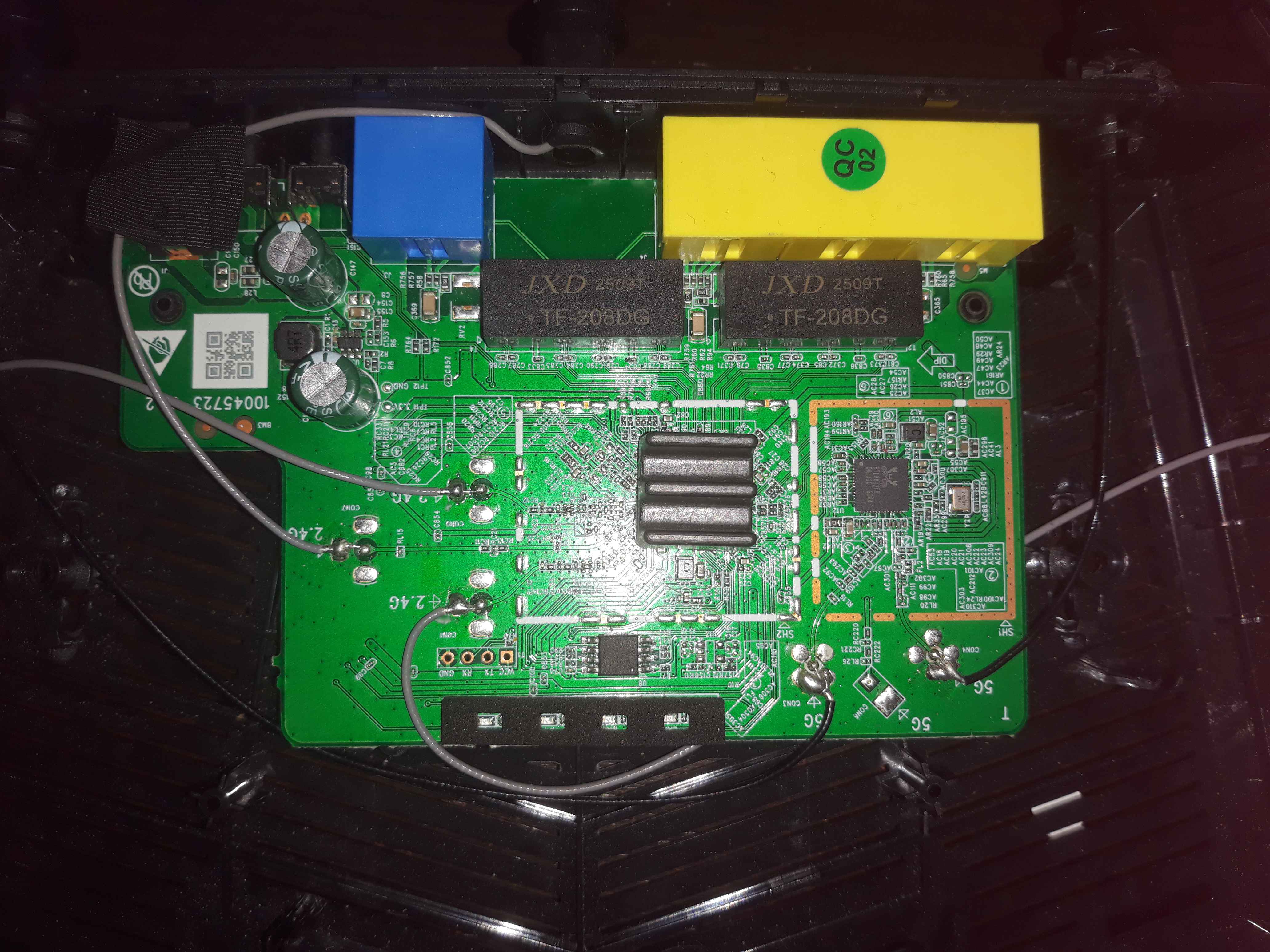
We selected the Tenda AC7 (1200) router which is a basic Wi-Fi and Ethernet router sold by Tenda. Because it’s not produced by a very large vendor, we thought it would be a good introductory target for hardware hacking.Tenda router. it's a most basic Wifi and Ethernet router vendored by Tenda, since it isn't too big of a vendor I figured this could be a good introduction to hardware hacking.
Hacking
UART CCESS
After opening the router we found exposed UART pins on the board, which allowed us to obtain an initial shell prompt.
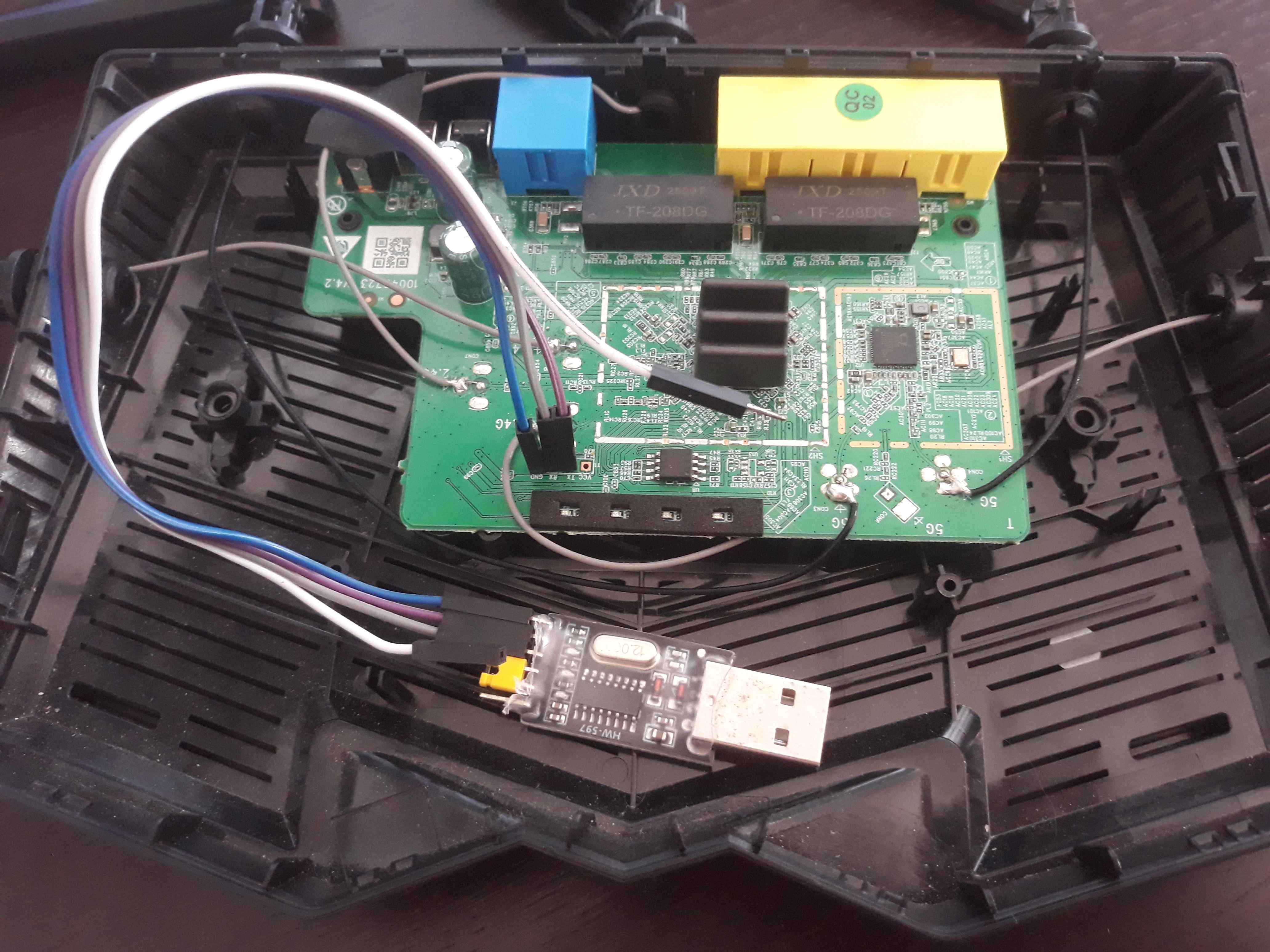
The UART shell presents two categories of commands: Realtek commands (likely supplied by the SoC vendor) and Tenda commands added by the vendor. The gadgets of particular interest were the Realtek memory-access commands such as db (display byte) and eb (edit bytes), which allow reading and writing arbitrary SoC memory. Most other commands are for configuration and debugging. The shell also includes networking commands and some vendor utilities.
The db and eb commands were especially useful because they let us read raw memory regions of the SoC, which provides a way to extract firmware and kernel images if they are mapped into readable memory.
The first things we tried was to list the file system, but every folders were empty. Maybe the server as somem kind of RBAC and we'll need to escalate our privileges, or it could also be possible that all the files are stored in RAM.
CLI> help
Realtek's command:

Commands    Descriptions                             Usage
--------    ------------                             -----
db          db <Address> <Len>
dw          dw <Address> <Len>
eth         eth
wlan0       wlan0
wlan0-va0   wlan0-va0
wlan0-va1   wlan0-va1
wlan0-va2   wlan0-va2
wlan0-va3   wlan0-va3
wlan0-vxd   wlan0-vxd
wlan1       wlan1
wlan1-va0   wlan1-va0
wlan1-va1   wlan1-va1
wlan0-va2   wlan0-va2
wlan1-va3   wlan1-va3
wlan1-vxd   wlan1-vxd
eb          eb <Address> <Value1> <Value2>...
ew          ew <Address> <Value1> <Value2>...
alg         alg
brconfig    brconfig
cat
cpuload     cpuload
date        show system local time
excep       cause exception
fastpath    fastpath
getmib      getmib
help        Displays a list of commands
?           Displays a list of commands
hexcat
dump        Shows a memory dump
hw_nat      hw_nat
ib          ib
idd         idd
ifconfig    ifconfig
ip6fw       ip6fw
ipfw        ipfw
irf         irf
iw          iw
iwpriv      iwpriv
ll
mac         mac <ifname> [mac addr]
mroute      mroute
ndp         ndp
ob          ob
od          od
orf         orf
ow          ow
pdump       dump a  thread
ping        ping
port_fwd    port_fwd
version     Shows build version
ps          Shows a list of threads
reboot      Reset the system
reinit      reinit
reinit_test reinit_test
reset       Reset the system
route       set static route
rssi        rssi
alias       show alias table
rtl_vlan    rtl_vlan
sp          Sets a threads priority                  [thread ID]
setmib      setmib
show        show
tcpstats    tcpstats
test_skb    test_skb
kill        Kills a running thread                   [thread ID]
release     Break a thread out of any wait           [thread ID]
trigger_port trigger_port
uptime      Shows system uptime
watchdog    on/off/res/reboot

Tenda's command:
msg         ipnat       spi_unlock  rs          show_arp_bufce_power
app_debug   build       stat_link   link_status iwpriv      realtek
splx        thread      mbuf        debug       route       et
wlconf      fw          ping        ifconfig    syslog      time
tenda_arp   arp         envram      nvram       restart     reboot
ifconfig6   cat         route6      ping6
Boot sequence
The UART boot log was very talkative and provided a number of useful details: the SoC and flash vendor/type, DRAM type, DRAM size and frequency, the flash part number, vendor messages, the kernel decompression address and startup address, MAC address, and the web server and UPnP services started by the system.
In conclusion, the boot messages revealed:
- The SoC (RTL8197F family) and bootloader version/date.
- The flash chip vendor and model (Winbond W25Q16 or similar) and its size (2 MB).
- The kernel image load/start addresses and that the kernel was decompressed at boot.
- The embedded web server GoAhead.
Booting...
init_ram

DDR init OK
init ddr ok

DRAM Type: DDR2
    DRAM frequency: 533MHz
    DRAM Size: 32MB
JEDEC id EF4015, EXT id 0x0000
found w25q16
flash vendor: Winbond
Flash is locked!
w25q16, size=2MB, erasesize=4KB, max_speed_hz=41MHz
auto_mode=0 addr_width=3 erase_opcode=0x00000020
Write PLL1=80c00042
=>CPU Wake-up interrupt happen! GISR=89000080

RTL8197F-VG boot release version:672 (Sep 18 2020-09:23:56) (999MHz)
Mac addr:58-d9-d5-d2-6b-60
use Switch new descriptor
wait for upgrage
port link 0x000030e0 0x000030e0 0x000030e0 0x000030e0
irq:0x00008080
Jump to image start:0x80700000...
decompressing kernel:
Uncompressing... done, booting the kernel.
done decompressing kernel.
start address: 0xa0000600

...SNIP...

Configuration for Embedthis GoAhead Community Edition
---------------------------------------------
Version:            5.1.0
BuildType:          Release
CPU:                mips
OS:                 ecos
Host:               192.168.0.1
Documents:
---------------------------------------------
Started http://192.168.0.1:80
Started https://192.168.0.1:443
Started http://fe80:0001::5ad9:d5ff:fed2:6b60:80
Started https://fe80:0001::5ad9:d5ff:fed2:6b60:443
[TPI->tpi_http_start->143]:http start success!
[TPI->tpi_upnp_start->107]:start success!

...SNIP...
This boot sequence gives a lot of future useful informations, from the name of the Chip holding the flash, to the name of the microcontroller and the address where the kernel is situated, as well as the name of the linux kernel.
Firmware dump
We used two complementary approaches to obtain the firmware: direct SPI flash reading and memory dumping via UART.
From SPI
The flash chip on the board is a Winbond W25Q16 (W25Q16JVSSIQ). It communicates via SPI and all its pins were accessible. We initially tried to capture the SPI traffic with a low-end logic analyzer, but it was limited to 24 MHz and couldn’t reliably capture the flash operating at ~130 MHz. So we switched to a dedicated SPI programmer (ch341a) and used flashrom to read the chip directly.
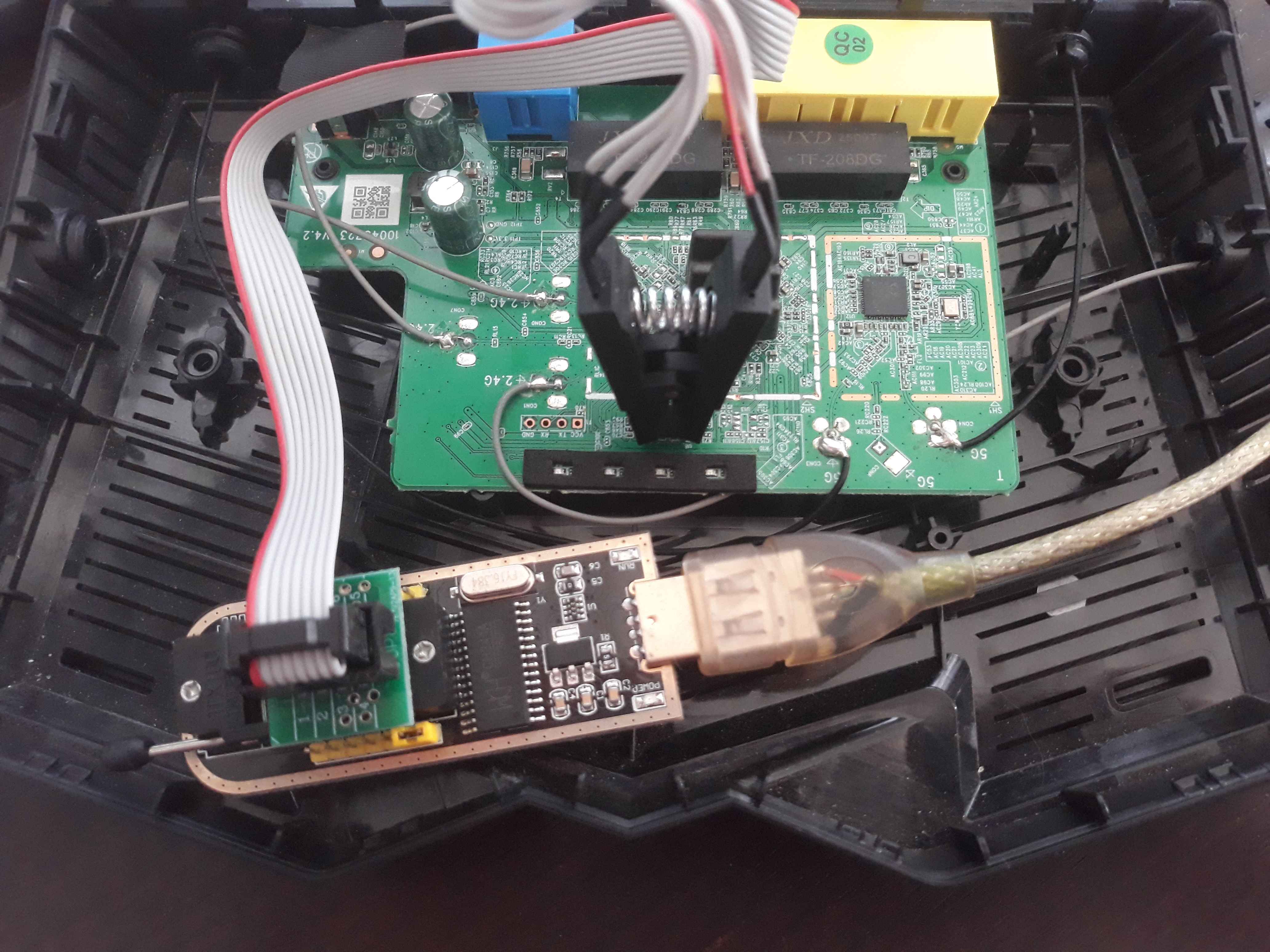
~ $ flashrom --verbose --chip "W25Q16.V" --programmer ch341a_spi --read content-v3.bin
The SPI read produced a 2 MB image, which we further analyzed with binwalk.
~ $ binwalk flash-dump.bin

/home/kaddate/projets/Tenda_Router/tristan_tenda/extract/content.bin
------------------------------------------------------------
DECIMAL                            HEXADECIMAL                        DESCRIPTION
------------------------------------------------------------
35096                              0x8918                             CRC32 polynomial table, little endian
36192                              0x8D60                             gzip compressed data, operating system: Unix, timestamp: 2020-09-18 01:24:02, total size: 39102 bytes
141336                             0x22818                            LZMA compressed data, properties: 0x5D, dictionary size: 8388608 bytes, compressed size: 1503886 bytes, uncompressed size: 5150536 bytes
------------------------------------------------------------

Analyzed 1 file for 85 file signatures (187 magic patterns) in 43.0 milliseconds
From UART
Because the SoC maps the SPI flash into the CPU address space at the address 0xb0000000 into a region of 128MB, we were also able to dump memory via the UART shell using the db command. We requested a large read (about 10 MB) from the flash-mapped region using the db command and saved the textual hexdump from the UART to a file. The dump itself took more than 3 hours.
~ $ db 0xb0000000 0xa00000
Converting the hexdump back into a binary gave a dump that closely matched the SPI read. The fact that the data repeats itself is not explained (see binwalk output), but my guess is that when reading the memory of the Flash Chip using the UART interface, the SoC actually makes read calls to the Chip and it may apply a modulus on the addresses that exceeds its memory, like most CPUs. In any case the UART-based extraction produced the same firmware blobs (DEFLATE/LZMA) as the SPI read.
~$ binwalk laptop_flash-dump-uart.bin

                      /home/kaddate/projets/Tenda_Router/UART/laptop_flash-dump-uart.bin
---------------------------------------------------------------------------------------------------------------
DECIMAL                            HEXADECIMAL                        DESCRIPTION
---------------------------------------------------------------------------------------------------------------
35096                              0x8918                             CRC32 polynomial table, little endian
36192                              0x8D60                             gzip compressed data, operating system: Unix, timestamp: 2020-09-18 01:24:02, total size: 39102 bytes
2132248                            0x208918                           CRC32 polynomial table, little endian
2133344                            0x208D60                           gzip compressed data, operating system: Unix, timestamp: 2020-09-18 01:24:02, total size: 39102 bytes
2238488                            0x222818                           LZMA compressed data, properties: 0x5D, dictionary size: 8388608 bytes, compressed size: 1503886 bytes, uncompressed size: 5150536 bytes
4229400                            0x408918                           CRC32 polynomial table, little endian
4230496                            0x408D60                           gzip compressed data, operating system: Unix, timestamp: 2020-09-18 01:24:02, total size: 39102 bytes
4335640                            0x422818                           LZMA compressed data, properties: 0x5D, dictionary size: 8388608 bytes, compressed size: 1503886 bytes, uncompressed size: 5150536 bytes
6326552                            0x608918                           CRC32 polynomial table, little endian
6327648                            0x608D60                           gzip compressed data, operating system: Unix, timestamp: 2020-09-18 01:24:02, total size: 39102 bytes
6432792                            0x622818                           LZMA compressed data, properties: 0x5D, dictionary size: 8388608 bytes, compressed size: 1503886 bytes, uncompressed size: 5150536 bytes
8423704                            0x808918                           CRC32 polynomial table, little endian
8424800                            0x808D60                           gzip compressed data, operating system: Unix, timestamp: 2020-09-18 01:24:02, total size: 39102 bytes
---------------------------------------------------------------------------------------------------------------

Analyzed 1 file for 85 file signatures (187 magic patterns) in 208.0 milliseconds
kernel dump
Another dump possible is the dump of the RAM, We figured that if the Kernel is packed in some ways, the RAM would held the unpacked kernel. We dumped it using the UART terminal and the informations given by the boot and the microcontroller datasheet.
➜  UART binwalk laptop_memory_dump_uart.bin

                                         /home/kaddate/projets/Tenda_Router/UART/laptop_memory_dump_uart.bin
-----------------------------------------------------------------------------------------------------------------------------------------------------
DECIMAL                            HEXADECIMAL                        DESCRIPTION
-----------------------------------------------------------------------------------------------------------------------------------------------------
384                                0x180                              eCos kernel exception handler, MIPS little endian
3377032                            0x338788                           Copyright text: "Copyright (c) Embedthis Software Inc., 1993-2014. All Rights
                                                                      Reserved.Copyright (c) GoAhead Software"
3449592                            0x34A2F8                           CRC32 polynomial table, little endian
3451968                            0x34AC40                           SHA256 hash constants, little endian
3482168                            0x352238                           SHA256 hash constants, little endian
3507104                            0x3583A0                           AES S-Box
3959612                            0x3C6B3C                           PEM certificate
3967792                            0x3C8B30                           PEM private key
3969468                            0x3C91BC                           PNG image, total size: 1332 bytes
3970804                            0x3C96F4                           PNG image, total size: 392 bytes
3971200                            0x3C9880                           GIF image, 18x18 pixels, total size: 1407 bytes
3972608                            0x3C9E00                           PNG image, total size: 13652 bytes
3986264                            0x3CD358                           PNG image, total size: 848 bytes
3987116                            0x3CD6AC                           PNG image, total size: 1187 bytes
3988304                            0x3CDB50                           PNG image, total size: 15089 bytes
4003396                            0x3D1644                           PNG image, total size: 354 bytes
4003791                            0x3D17CF                           SVG image, total size: 1322 bytes
4005116                            0x3D1CFC                           PNG image, total size: 3421 bytes
4008540                            0x3D2A5C                           PNG image, total size: 939 bytes
4009480                            0x3D2E08                           PNG image, total size: 871 bytes
4010352                            0x3D3170                           PNG image, total size: 1523 bytes
4011915                            0x3D378B                           SVG image, total size: 1267 bytes
4013184                            0x3D3C80                           PNG image, total size: 2809 bytes
4015996                            0x3D477C                           PNG image, total size: 609 bytes
4016608                            0x3D49E0                           PNG image, total size: 767 bytes
4434540                            0x43AA6C                           Copyright text: "Copyright 2013 Scott Jehl * Licensed under
                                                                      https://github.com/scottjehl/Respond/blob/master/LICENSE"
4457708                            0x4404EC                           Copyright text: "Copyright 2014 ET.W * Licensed under Apache License v2.0 * *
                                                                      The REasy UI for router, and themes "
4605608                            0x4646A8                           AES S-Box
5690224                            0x56D370                           AES S-Box
5698928                            0x56F570                           AES S-Box
6880900                            0x68FE84                           CRC32 polynomial table, little endian
-----------------------------------------------------------------------------------------------------------------------------------------------------

Analyzed 1 file for 85 file signatures (187 magic patterns) in 49.0 milliseconds
The RAM dump contained many recognizable artifacts: embedded web resources (HTML/CSS/JS), images, certificates/keys, and cryptographic constants (SHA256, AES S-box tables), as well as strings and license texts referencing embedded components (for example, GoAhead web server and some open-source UI libraries). We also observed and identified eCos Kernel pattern which indicates that we might have dumped the unpacked kernel correctly.
Looking into the Bootloader
Since we don't how the bootloader launches the kernel, we decided to throw it into Ghidra. We started by identifying the entry() function located at 0x0c in the SPI flash and 0xb000000c in the SoC. It first configures the lower bits of a set of proprietary pin registers (REG_PINMUX_04, REG_PINMUX_05), then writes to undocumented UART registers in the rt_uart_1 memory region to print the first boot string: Booting....
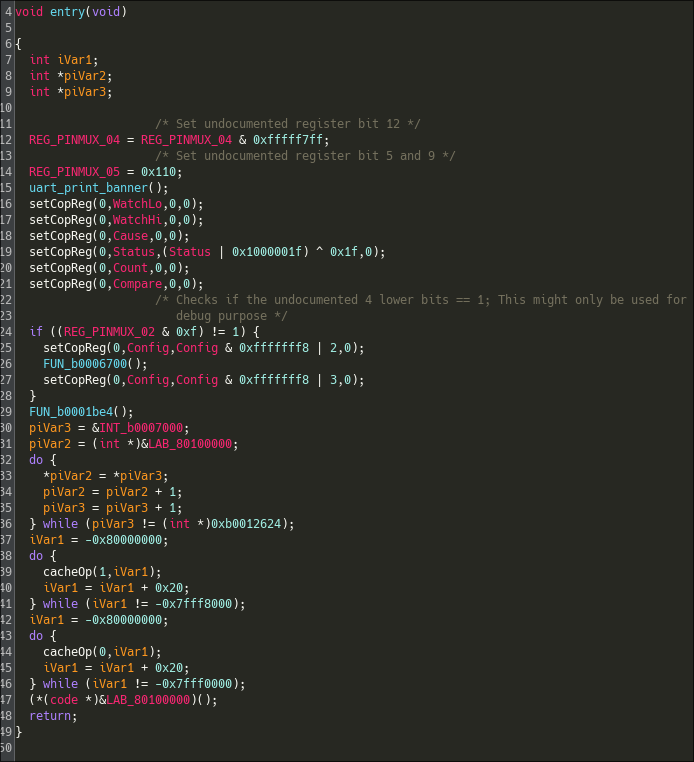
After some coprocessor configuration, the bootloader initializes the DRAM. Unfortunately, much of the code interacts with proprietary, undocumented memory regions that are neither described in the datasheet nor accessible from the UART shell. Attempts to read those regions via the UART just return zeros, which suggests they may be protected or bank-switched.
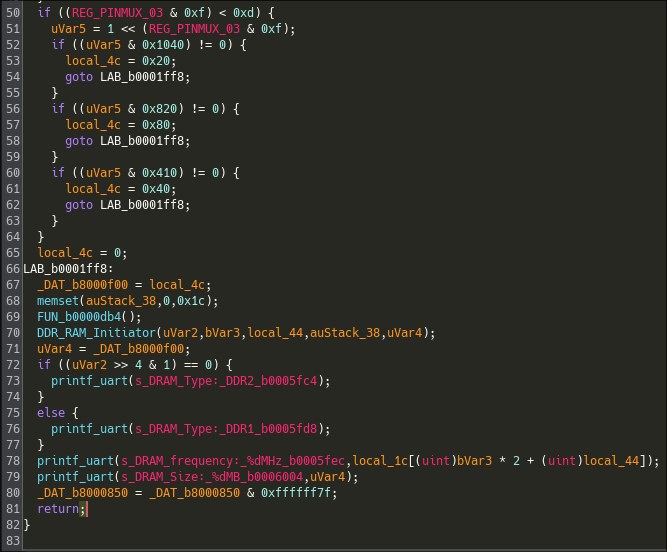
The next major function we identified prepares a buffer using a routine that we identified as memset(), then calls several subroutines that depend heavily on vendor-specific registers and interrupt/handler tables. These routines appear to configure hardware peripherals and low-level runtime state before jumping to the decompression/kernel entry.
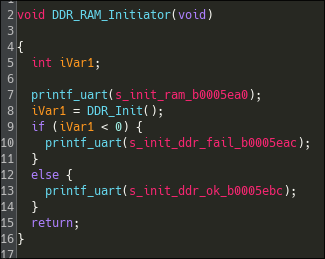
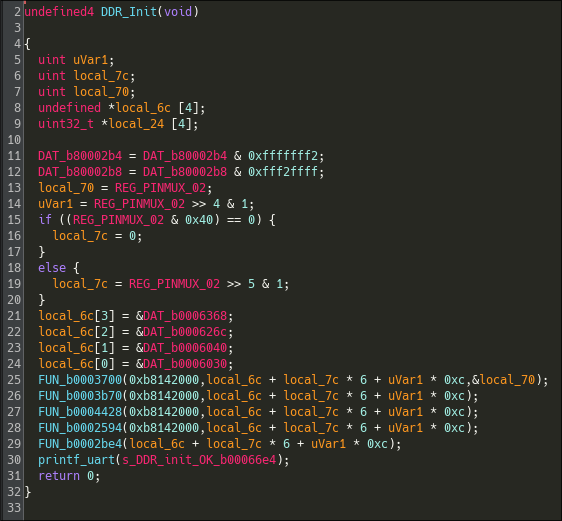
Overall, we were able to map out the high-level responsibilities of the boot stages and name several key routines, but we did not reverse every detail. Determining the exact purpose of each pin and register will require significant additional work. Iterating between static analysis in Ghidra, dynamic testing on hardware, and emulation to observe side effects, confirm register semantics, and handle any protection mechanisms.
Notes and lessons learned
- First and foremost: methodology. Since this was our first hardware-hacking attempt, we learned a lot about how to structure future sessions. We realised we rushed in headfirst and should have been more patient. Spending more time analysing the data and artifacts we found, planning our steps, and iterating between static and dynamic analysis instead of jumping straight to the next action.
- Hardware hacking can be cheap! However, tool quality matters. While inexpensive tools are great to get started, they can also become a limitation. Our low-end logic analyser couldn’t capture the flash at its actual clock speed, forcing us to fall back on the SPI programmer and UART extraction (which was also very shady). For similar targets, it’s worth investing in (or borrowing) a slightly better analyser or programmer and pogo pins.